
FireFox add-on for easily typing in Indian Scripts
Many of you are aware of Pramukh Type Pad for easily typing into 9 Indian script. I have also created many IndicIME plugin for TinyMCE 2.x, 3.x, FCKEditor and PramukhLib javascript library to easily integrate it with existing Website and enable Indian script typing for its visitor. This requires the Website to install this plugin/library onto their server. It gives benefit to the Website owner that visitor can easily type in choosen Indian script but if the visitor is avid Indian script writer, s/he has to type in Indian script somewhere else and copy/paste the writing if Website s/he visits does not contain above mentioned script. To alleviate this problem, I have created Add-On for avid Firefox user. It supports Firefox 1.5 – 3.x. You can download this add-on from https://addons.mozilla.org/en-US/firefox/addon/10827. Currently this add-on is under review mode so it requires user to login and then download. Click the link below if you want to download from this blog.
Download Pramukh Type Pad Firefox Add-On
Installation instruction:
If you download from mozilla add-on website, after login, click on “Add to Firefox” button and Firefox will automatically ask you to install it. Click on Install button and restart firefox.
If you download from my blog, it is a zip file. Unzip the file on your computer. The extracted file is “pramukhtypepad_ff_25.xpi”. From Firefox, go to File Menu > Open File…. Now locate the extracted file and press “Open”. It will ask you to install it. Click on Install button and restart firefox.
After restarting, it will add Script Menu at the top. You can choose the script you want to type in. This add-on has all the functionality that Pramukh Type Pad has. Pressing F12 will toggle the selected Indian script with English. Also at the bottom right status bar, you will your selected script. This add-on remembers the selected script and when you open up the browser next time, it will automatically select the last selected script for you.
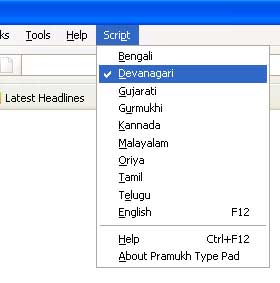
Enjoy typing in your favourite Indian language.
Great work Vishal… this is working like a charm !
Great service to all Indian community… Congrats and Thanks !
Salute to you !
Congratulations…
Please continue doing the wonders in the computers and computer related word..
Vijay Shah
good stuff
I have learned a lot from your blog. I have been a copywriter and I really loved to see your blog. Well done!
regards
Bapu,
You really thinks like a genius.
Keep it up!
Dear Vishal
ગુજરાત ની બહાર કે ગુજરાત માં પણ ગુજરાતી માં પત્ર લખવો હવે દુર્લભ થૈ ગયો છે, ત્યારે મિત્રો ને ગુજરાતી માં પત્ર લખવા મળે કે જવાબ મળે ત્યારે ફરી પછા પત્રવ્યવહાર ના જમાના માં ભુતકાળ માં ગયા હોવા નો આનન્દ મળે છે, ગુજરાત અને ગુજરાતી ઓ માટે આનાથી મોટિ સેવા ન હોઇ શકે… ભગવાન સ્વામીનારાયણ ની સાચી સેવા કરી રહ્યા છો… જય સ્વામીનારાયણ્…
દીપક દવે
Hello Vishal,
I downloaded you Indic IME plugin for wordpress, I tried to use it with latest version of wordpress, no error message was shown however its not working.
Please get some time to look into that matter to update the plugin if required or let me know, if i’m making some mistake
Thanks,
RC Mishra
@RC Mishra
Dr. Mishra,
Make sure that you have uploaded “indicime” folder at proper location. Please refer to readme.txt as it is bit tricky.
Thanks Vishal,
I used direct install from zip file using wordpress dashboard.
You were looking for the files on my main site however, I tried it on my हिन्दी ब्लॉग at http://hindi.rcmishra.com |
धन्यवाद!
Does not work with the latest firefox 3.5
@Piyush Patel
Piyush,
I am currently working on major improvements. I am going to release it within few days which will be compatible with FF 3.5
Update (7/23/09) – I have updated this add-on to make it compatible with FF 3.5
sir — મે આ પ્રકાર ના ( Bharat લખો અને ભરત લખાય તેવા વાપરી જોયા છે. પ્રમુખ ટાઇપ પેડ મને સૌથી સરળ અને સ્વછ્છ લાગ્યું છે.હું તેનો નિયમીત રીતે ઉપયોગ કરું છેં અને વાપરવાની ભલામણ તથા મને આવડે છે તેટલું માર્ગદર્શન કરું છે,
ભરત પન્ડ્યા
મોડરેટર યાહુ ગ્રુપ ભાવનગરિ તથ પ્રશ્નોરા
સહ તંત્રિસ્ય દરબાર,
પાર્ટી! આખરે અમારી માંગણી પુરી કરી ખરી!
ખુબ ખુબ આભાર.
હજી એક માંગણી માટે રાહ જોવી પડશે..
ફોંટ કંવર્ઝન ટૂલ ઓફલાઇન યુઝ માટે અવેલેબલ ક્યારે કરો છો?
Jay Swaminarayan ,
I , am retire person , I , like to write in Gujarati & Hindi , so
I , bought Unitype Global Writer , but their key pad is not perfect
it is word processor I ,try to buy your key pad but I , cannot contect you . So what should i, do
Virendra , Jai Swaminarayan
నేను తెలుగ లిపిలో బ్లాగులలో రాస్తుంటాను. ఇంతకు ముందు అక్షరమాల వాడాను. దానిని ప్రోగ్రామ్స్ నుండి ఎనేబల్ చేసుకొని టైప్ చేయాల్సి వచ్చేది. కాని ఇది చాలా ఈజీ గా వుంది. బాగుంది. విశాల్ గారికి థాంక్స్.
vishalbhai,
khub khub abhar.parantu,gujarati-hindi banema “tha”mate kaik alag hovu joie,athava mari kaik bhul hoi sake kemke hu sav j computer illitred chhu,pan tame aetu saraltathi samjavu chhe ke tarat samjai gau.mara jeva mate khub upyogi chhe.abhar sah
શ્રી વિશાલભાઈ,
નમસ્કાર, કુશળ હશો.
ગુજરાતીમાં યુનિકોડ પછી પ્રમુખ IME એક અભૂતપૂર્વ ક્રાંતિ સર્જવામાં સફળ રહી છે. સુંદર અને સહેલા ટાઈપિંગ માટે પ્રમુખ IME માટે આભાર. અમારા જેવાને તો તમે ફોન્ટ અટેચમેન્ટમાંથી મુક્તિ અપાવી દીધી. હજુ બે માંગણીઓ છે. પૂરી થશે તો ખુબ જ રાહત મળશે અમને.
૧. શોર્ટકટ કી Ctrl અથવા Alt સાથે આપો તો અનુકુળ રહેશે. આપેલી ચાર ફંક્શન કી ઘણાં સોફ્ટવેરમાં મુશ્કેલી સર્જે છે.
૨. યુનિકોડ ગુજરાતીમાં લખાયેલ લખાણ મોઝીલા-ફાયરફોક્સમાં બરાબર રેન્ડર થતાં નથી. ‘હ્રસ્વ ઇ’ વ્યંજનની પછી મૂકાયેલો મળે છે. કોઈ રસ્તો?
ફરી એક વખત આભાર
અશ્વિન ચંદારાણા, એ-૨૨૮, સૌરભપાર્ક, સુભાનપરા, વડોદરા-૨૩, ૯૬૦૧૨૫૭૫૪૩
Where is it possible to get the keymap for the devnagri font? For example, I am still not able to type “apple” in devnagari. what keys must be pressed for typing the accent a in apple? Where could I get the other keymap functions? Thanks!! : )
@Vaibhav
Select “Devanagari” from the “Script” menu and then select “Help”. It will open up dialog for devagari key map. I have also created software called PramukhIME using which you will be able to type in Indian languages directly in MS Word, Notepad, Firefox, Internet Explorer in short all application in computer. You can download it from http://www.vishalon.net/Download.aspx
Hey Vishal,
Firefox 3.6 is up and the current version of your firefox add-on is not compatible with it. Can you please look through it and give us a firefox 3.6 compatible add-on? I appreciate your work!
regards – Vimal
@Vimal
Thanks for notifying me. I have updated plugin.
@Vishal
That’s so great of you! Thanks!
I am interested in Apple Macintosh based support for Firefox, Office, Graphic Programmes like Freehand, pagemaker, Illustrator, Quark Express etc. The objective is to have the FONTs in Hindi, Marathi, Gujarati with needful keyboards to be used for reading, typesetting and printing. Can you help on this objective ? If yes, please reply. Jai Swaminarayan. Thanks and Regards Kailesh Shah